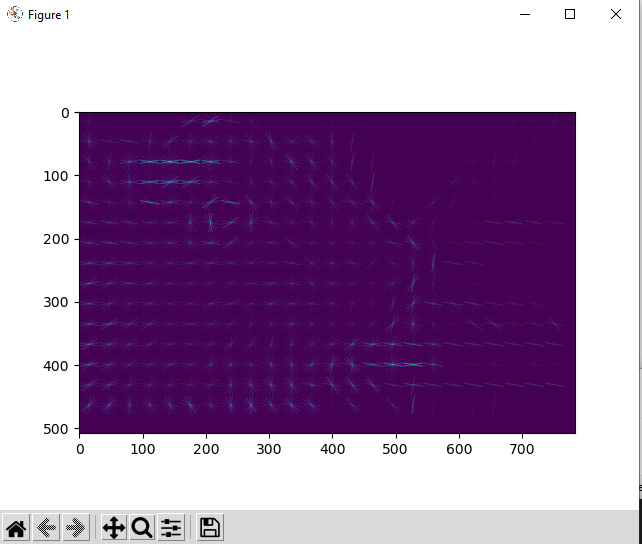
Okay, new update! It turns out that while this runs to completion, the data that’s output isn’t quite right! The HOG images and descriptors are full of 0s for some reason! Something is going wrong somewhere… gotta dive in and see where.
EDIT:
We solved it!
Gogolla Lab member @StoyoKaramihalev discovered a bug with the dask implementation of HOG calculations! The data that was written to disk was discovered to be entirely full of zeros! Not very helpful for doing facial expression analysis.
When you looked at the output of the script, you ended up with things like this:
@ParticularMiner and I spent some time this evening hacking out what the cause could be…
It turns out that the reason for this was in the current version’s code on line 194: The dtype was specified to be the same dtype as the gray_frames block.
We initially thought that since we were getting images out of the hog() function, we might as well stay consistent with the data type we were using, but we did this without double checking what the datatypes were of the returned objects from hog()! hog() returns objects as float64 and the original images are uint8. For reasons I don’t quite understand yet, converting from float64 to uint8 yields a 0 value for all the data in the returned objects! Perhaps hog() returns values that are all decimals or something?
If we instead specify the datatype to be float64 by stating dtype = first_hog_image.dtype, we retain the correct data type when all the downstream computations are performed by Dask!
If we specify dtype as the value from gray_frames, the returned value of the dask array will be converted to that type. See here in the docs.
This was tested by @ParticularMiner through the use of compute() on a small test video. The values of the data were all correct before being written to disk via to_zarr! So that clued us in that we were doing something incorrectly not with the make_hogs function but rather with our call to_zarr. I checked out some datatypes of the written zarr vs. the compute result that @ParticularMiner found and noticed they were different! When we tried keeping the datatype as float64 from the output of make_hogs, everything worked like it was supposed to!
Here’s the kind of result you can get now:
So, here’s the updated version that seems to work like it’s supposed to:
# Adapted repository for mouse facial expression analysis from Dolensek et al 2020
# Written with the gracious help of John Kirkham, Josh Moore, and Martin Durant (Dask/Zarr Developers)
# ParticularMiner, Jeremy Delahanty May 2022

import zarr
import numpy as np
import time
import warnings
# Import Histogram of Oriented Gradients (HOG) function for expression assessment
from skimage.feature import hog
# Use Blosc as compressor for zarrs written to disk
from numcodecs.blosc import Blosc
# Use PIMS for laziliy loading video files into numpy arrays
import pims
# Use dask.config to set scheduler as using processes
import dask.config
# Use dask.array for using to_zarr method later
import dask.array as da
# Use dask_image.imread to read in video data via pims and create dask arrays as a result
import dask_image.imread

# You could use this class that ParticularMiner wrote to read video into grayscale; left since it is
# informative on how to use custom PIMS readers.

# class GreyImageIOReader(FramesSequence):
#     class_priority = 100  # we purposefully set this very high to force pims.open() to use this reader
#     class_exts = pims.ImageIOReader.class_exts

#     def __init__(self, filename, **kwargs):
#         self._reader = pims.ImageIOReader(filename, **kwargs)
#         self.filename = self._reader.filename

#     def close(self):
#         self._reader.close()  # important since dask-image uses pims.open() as a context manager

#     def get_frame(self, n):
#         return pims.as_grey(self._reader.get_frame(n))

#     def __len__(self):
#         return self._reader.__len__()

#     @property
#     def frame_shape(self):
#         return self._reader.frame_shape[:-1]

#     @property
#     def pixel_type(self):
#         return self._reader.pixel_type

def as_grey(frame):
    """Convert a 2D image or array of 2D images to greyscale.
    This weights the color channels according to their typical
    response to white light.
    It does nothing if the input is already greyscale.
    (Copied and slightly modified from pims source code.)
    """

    if len(frame.shape) == 2 or frame.shape[-1] != 3:  # already greyscale
        return frame
    else:
        red = frame[..., 0]
        green = frame[..., 1]
        blue = frame[..., 2]
        return 0.2125 * red + 0.7154 * green + 0.0721 * blue

def make_hogs(frames, coords, kwargs):
    """
    Performs cropping and HOG generation upon chunk of frames.
    A chunk of frames received from dask_image.imread.imread is operated
    on with this function. The coordinates supplied are from cropping performed
    in a previous step on an example image and are used for cropping the chunk
    of frames supplied. The kwargs used define arguments that hog() expects.
    In this use case, both the HOG images and descriptors are returned.
    """

    # frames will be a chunk of elements from the dask array
    # coords are the cropping coordinates used for selecting subset of image
    # kwargs are the keyword arguments that hog() expects
    # Example:
    # kwargs = dict(
    # orientations=8,
    # pixels_per_cell=(32, 32),
    # cells_per_block=(1, 1),
    # transform_sqrt=True,
    # visualize=True
    # )

    # Perform cropping procedure upon every frame, the : slice,
    # crop the x coordinates in the second slice, and crop the y
    # coordinates in the third slice. Save this new array as
    # new_frames
    new_frames = frames[
        :,
        coords[1]:coords[1] + coords[3],
        coords[0]:coords[0] + coords[2]
    ]

    # Get the number of frames and shape for making
    # np.arrays of hog descriptors and images later
    nframes = new_frames.shape[0]
    first_frame = new_frames[0]

    # Use first frame to generate hog descriptor np.array and
    # np.array of a hog image
    hog_descriptor, hog_image = hog(
        first_frame,
        **kwargs
        )

    # Make empty numpy array that equals the number of frames passed into
    # the function, use the fed in datatype as the datatype of the images
    # and descriptors, and make the arrays shaped as each object's shape
    hog_images = np.empty((nframes,) + hog_image.shape, dtype=hog_image.dtype)
    hog_descriptors = np.empty((nframes,) + hog_descriptor.shape, dtype=hog_descriptor.dtype)

    # Until I edit the hog code, perform the hog calculation upon each
    # frame in a loop and append them to their respective np arrays
    for index, image in enumerate(new_frames):
        hog_descriptor, hog_image = hog(image, **kwargs)
        hog_descriptors[index, ...] = hog_descriptor
        hog_images[index, ...] = hog_image

    return hog_descriptors, hog_images


def get_ith_tuple_element(tuple_, i=0):
    """
    Utility function for grabbing different data out of each
    returned tuple of numpy arrays from make_hogs().
    0 = images
    1 = descriptors
    """
    return  tuple_[i]


def normalize_hog_desc_dims(tuple_):
    # add more dimensions (each of length 1) to the hog descriptor chunk in
    # order to match the number of dimensions of the hog_image
    descriptor = tuple_[0]
    image = tuple_[1]
    if descriptor.ndim >= image.ndim:
        return tuple_[0]
    else:
        return  np.expand_dims(
            tuple_[0], axis=list(range(descriptor.ndim, image.ndim))
        )

# For each instance of PIMS opening the video it seems that it will warn you that
# the number of frames in  your video will not divide cleanly. You can ignore this
# warning.
warnings.filterwarnings('ignore', '`nframes` does not nicely divide')

# Wrap functions in a __name__ = "__main__" statement for allowing threads to spawn
# (fork in Linux case) properly. The reasons for this are still fuzzy to me...
if __name__ == "__main__":

    program_start = time.perf_counter()

    video_path = "path/to/video.mp4"

    pims.ImageIOReader.class_priority = 100  # we set this very high in order to force dask's imread() to use this reader [via pims.open()]

    # These coords are determined beforehand, should later be loaded from disk or have fiducial cropping performed so everything is the same
    coords = (496, 174, 992, 508)

    # Use dask_image's reader to read your frames via PIMS, change nframes according to
    # your chunksize, which will likely be determined by your machine's available RAM mostly...
    original_video = dask_image.imread.imread(video_path, nframes=16)

    # kwargs to use for generating both hog images and hog_descriptors
    # Values from original paper Dolensek et al 2020 in Science
    kwargs = dict(
        orientations=8,
        pixels_per_cell=(32, 32),
        cells_per_block=(1, 1),
        transform_sqrt=True,
        visualize=True
    )

    # Map the chunks of original video to as_grey function, basically drop
    # the color channel for each frame.
    grey_frames = original_video.map_blocks(as_grey, drop_axis=-1)

    # Define a meta for the shape of the dask arrays that are returned.
    # Both the images will be returned as a 3D numpy array.
    # Images: 2D images, several images per chunk
    # Descriptors: 2D histogram, several descriptors per chunk
    meta = np.array([[[]]])

    # first determine the output hog shapes from the first grey-scaled image so that
    # we can use them for all other outputs:
    first_hog_descr, first_hog_image = make_hogs(
        grey_frames[:1, ...].compute(),
        coords,
        kwargs
    )

    # Provide the datatype of the hog images for writing dask arrays
    # later. If you use the datatype of the grey_frames, it will send all your
    # data to zero! Be sure to use the datatype that the function you're operating
    # with gives you unless it's safe to change it later!
    dtype = first_hog_image.dtype

    # Map the chunks of the grey_frames results onto the make_hogs() function.
    # Perform cropping, HOG calculations, and HOG image generation.
    my_hogs = grey_frames.map_blocks(
        make_hogs,
        coords=coords,
        dtype=dtype,
        meta=meta,
        kwargs=kwargs,
    )

    # Get the resulting images out of the returned tuple from my_hogs() chunks. Save that
    # as a dask array of images.
    hog_images = my_hogs.map_blocks(
        get_ith_tuple_element,
        i=1,
        chunks=(grey_frames.chunks[0],) + first_hog_image.shape[1:],
        dtype=dtype,
        meta=meta
    )

    # Define shape of the HOG descriptor arrays
    descr_array_chunks = (grey_frames.chunks[0],) + first_hog_descr.shape[1:]

    # Dask needs consistent shapes for performing computations in the graph. Add
    # the needed dimensions for the arrays to be passed through the computations.
    if first_hog_descr.ndim <= first_hog_image.ndim:
        # we will recreate the missing hog_descriptor axes but give them each a size of 1
        new_axes = []
        n_missing_dims = first_hog_image.ndim - first_hog_descr.ndim
        descr_array_chunks += (1,)*n_missing_dims
    else:
        new_axes = list(range(first_hog_image.ndim, first_hog_descr.ndim))

    # Do not use `drop_axes` here!  `drop_axes` will attempt to concatenate the
    # tuples, which is undesirable.  Instead, use `squeeze()` later to drop the
    # unwanted axes.
    hog_descriptors = my_hogs.map_blocks(
        normalize_hog_desc_dims,
        new_axis=new_axes,
        chunks=descr_array_chunks,
        dtype=first_hog_descriptor.dtype,
        meta=meta,
    )

    # Drop the last unneeded dimension of the descriptors
    hog_descriptors = hog_descriptors.squeeze(-1)

    # Define Blosc as the compressor
    compressor = Blosc(cname='zstd', clevel=1)

    # Tell dask to perform computations via processes and not threads. Using threads yields severe
    # performance decreases! I don't know specifically why it struggles so much...
    with dask.config.set(scheduler='processes'):
        da.to_zarr(hog_images, "path/to/data.zarr", component="images")
        da.to_zarr(hog_descriptors, "path/to/data.zarr", component="descriptors")

    print("Data written to zarr! Hooray!")

    # On a powerful machine (64 Cores, Intel Xeon, 256GB RAM), approx. 44k frames complete in
    # 8 minutes!
    program_end = time.perf_counter() - program_start

    print(f"PROGRAM RUNTIME: {program_end}")